

D – 1.0.17 – Release Notes – 2026/10/26
Version: D – 1.0.17
Connect to Tag Wizard Desktop: app.tagwizard.ai
🛠️ Enhancements
Find Equipment Classification Without the Guesswork
Struggling to find the right equipment classification?
Search for any Category, Type, Subtype, or Kind directly in the “Category” field. Select a result to populate all four classification fields automatically.
How It Works
- Navigate to your “Inventory”.
- Click the “Add Asset” button.
- Click the “Category” field.
- Search for any Category, Type, Subtype, or Kind directly in the Category field.
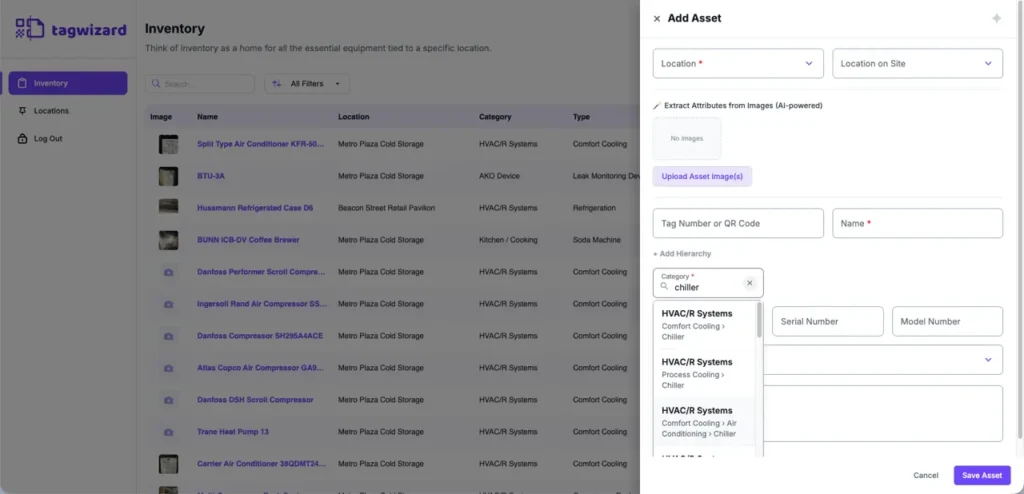
5. Select a result to automatically populate all four classification fields at once.
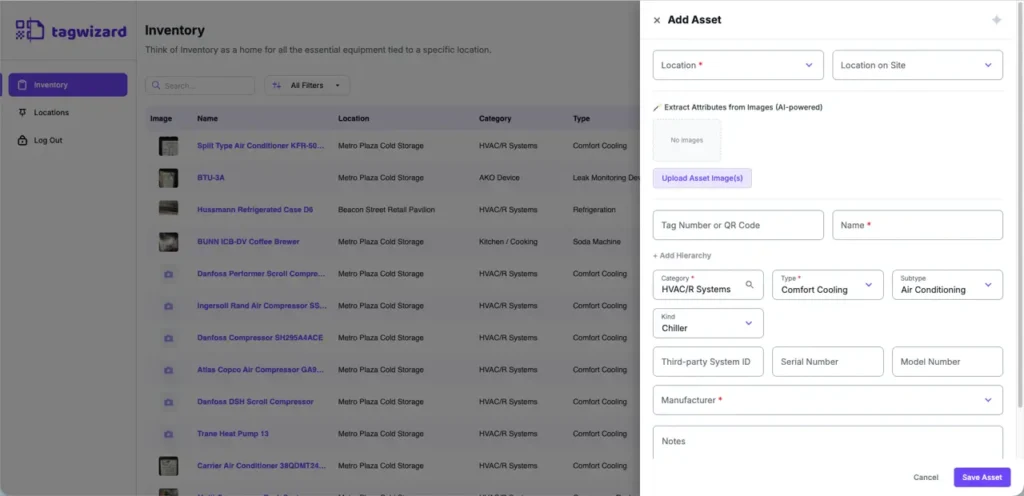
Why It’s Great
Not sure how to classify your equipment?
Search for what you know, and Tag Wizard finds the matching classification and fills in the fields for you. You can also ask Wizzy to help identify the right classification from the asset photo.